Recently, I was writing an article containing programming code on the WordPress website. The code had single and double quotes in it and noticed that when I did Copy and Paste from the article into a code editor and then try to run the code, it threw syntax errors. It turned out that WordPress was automatically changing some characters when displaying the code syntax. In this article, we will learn how to make sure that the "Copy and Paste" of quotes work without a problem.
What WordPress does by default is it transforms some of the common plain text characters into formatted entities, among them the quotation marks (both double and single quotes) that are transformed into a nicer looking Smart and Curly Quotes.
To solve this issue, we can either install a plugin for that purpose or add the code manually in the WordPress theme. Each approach work in a different way.
Using a plugin
There are quite a few plugins for this task. The most recent ones are:
Raw HTML
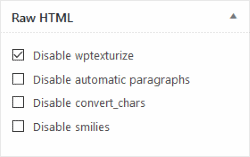
The Raw HTML plugin gives you ability to either:
- Wrap the programming code with
[raw][/raw]shortcode. - Disable wptexturize individual posts in the post editor as shown below:
wpuntexturize
If you only care for the quotation marks, then the wpuntexturize plugin might be for you. This one only prevents modifications of single and double quotes and it leaves other transformations alone.
Disable the transforms globally
To disable wptexturize feature in WordPress without the plugin and globally across the theme, we can add the following code inside the functions.php:
add_filter( 'run_wptexturize', '__return_false' );
Disable the transforms only for specific sections
We can also define more precisely where we want to remove the wptexturize. For example, if we only need to disable it in the content, we would do:
remove_filter( 'the_content', 'wptexturize' );
And for the title:
remove_filter( 'the_title', 'wptexturize' );
add_filter function with the 'wptexturize' callback.Disable the transforms only on specific template file
we can also disable the text transformations in specific template files. For example, for posts only, we would edit the single.php file and do something like this:
For the content:
remove_filter(  'the_content', 'wptexturize' );
the_content();
add_filter( 'the_content', 'wptexturize' );
And for the title:
remove_filter(  'the_title', 'wptexturize' );
the_title();
add_filter( 'the_title', 'wptexturize' );
In the above code, we turned the wptexturize off for a specific section, displayed that section, and turned that feature back on.
Conclusion
WordPress by default transforms quotes into so-called smart or curly quotes. This is all fine until you start having snippets of syntax code in your posts and your visitors start copying and pasting that code to make use of your snippets. It will make the code unworkable. Fortunately, the solution is simple. We need to disable wptexturize feature in WordPress. We can do this by either using plugins or by adding filters into the theme files.